What is the Withdrawal Whitelist?
The Withdrawal Whitelist locks crypto withdrawals to a list of addresses you have approved in advance. When it is on, BTSE will only send funds to an address on that list — a withdrawal to any other address is blocked, even if someone else has gained access to your account.
We recommend turning it on. It is the most effective protection available against unauthorized crypto withdrawals.
Before you start: 2FA is required
You need 2-Factor Authentication (2FA) set up on your account before you can use the Withdrawal Whitelist. If you haven't set it up, you will be prompted to do so first. See Setup/Remove 2FA.
How to turn on the Withdrawal Whitelist
On the website:
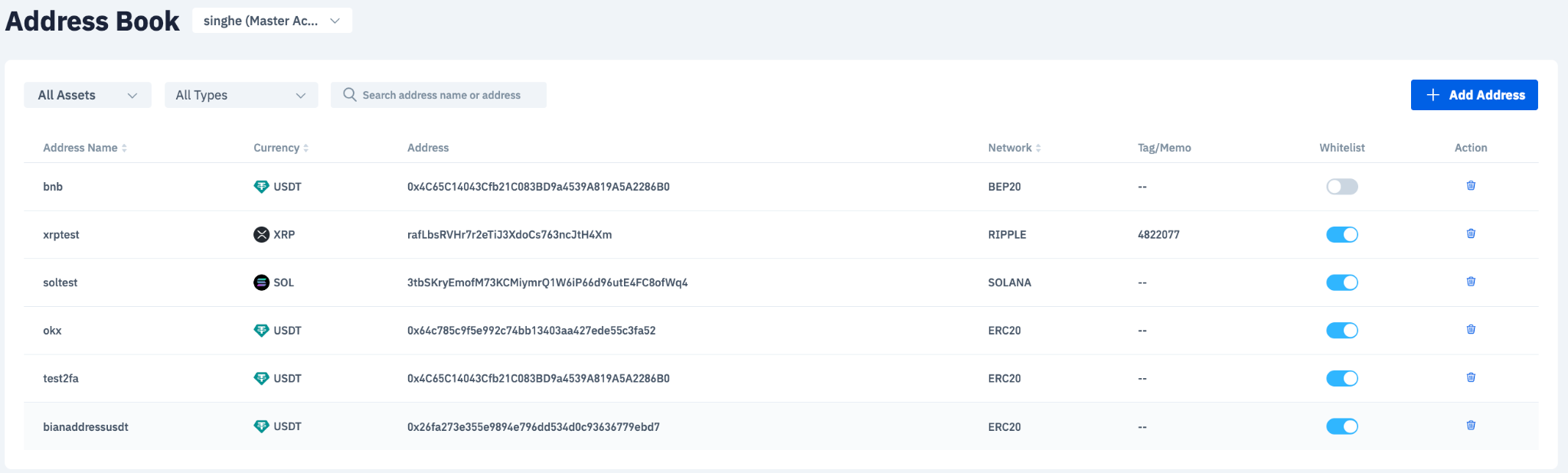
- Go to Security → Address Book.
- Turn on the Withdrawal Whitelist toggle.
- Review the confirmation prompt and select Continue.

On the BTSE App:
- Open your Address Book and go to the Whitelist tab.
- Turn on the Withdrawal Whitelist toggle.
- Review the confirmation prompt and select Continue.
What happens to the addresses I have already saved?
Every address already in your Address Book is whitelisted immediately — there is no waiting period for addresses you saved before turning the feature on.
You stay in control after that. You can toggle any individual address on or off your whitelist at any time.
Adding a new address once the whitelist is on
Any address you add to your Address Book after turning on the Withdrawal Whitelist must wait 24 hours before it can be whitelisted.
- During the 24 hours: the address cannot be added to your whitelist, so you cannot withdraw to it.
- After the 24 hours: add it to your whitelist manually, then withdraw as normal.
If you know you will need to send funds to a new address, add it to your Address Book a day in advance.
How to turn off the Withdrawal Whitelist
Turning the feature off is not immediate. Your account enters a Disabling state for 24 hours, and the whitelist restriction stays fully in force for that entire period. The feature is only switched off once the 24 hours have passed.
Both waiting periods exist for the same reason: if someone gains access to your account, they cannot simply switch the protection off — or add an address of their own — and withdraw straight away.
Why is my withdrawal blocked?
If the Withdrawal Whitelist is on and the destination address is not on your whitelist, the withdrawal will be blocked. Your options:
| Your situation | What to do | Time required |
|---|---|---|
| The address is already saved in your Address Book, but toggled off | Toggle it on in your whitelist | Immediate |
| The address is new | Add it to your Address Book, wait 24 hours, then whitelist it | 24 hours |
| You want the restriction removed entirely | Turn off the Withdrawal Whitelist | 24 hours |
Note that turning the feature off also takes 24 hours, so it is never the faster route. If an address is not whitelisted yet, the 24-hour wait applies either way.
Can I manage the whitelist for my sub-accounts?
If you hold the Master Account: yes. Use the account selector at the top of the Address Book page to switch to a sub-account's address book, then manage its whitelisted addresses there.
If you are logged in as a sub-account: the whitelist is read-only. You can view it, but you cannot enable or disable the feature, and you cannot add or remove whitelisted addresses. All changes must be made from the Master Account.


